
First-generation inReach
GRIB files on your inReach, with Earthmate.
The first-generation inReach Mini doesn't work with Garmin Messenger, only with the Earthmate app. reChain still works: you just need a trick to copy the messages you receive.
Same service, same price: 3 free requests every month.
How it works
Earthmate receives the messages, but won't copy them.
Your request goes out from Earthmate and the encoded messages come back to Earthmate, just as with Garmin Messenger. The only catch: in the conversation, Earthmate won't let you copy a message to paste it into reChain Grib.
The trick: forward the message. Earthmate then opens a new message containing the text, and that one you can select and copy. You don't send it: it's only there so you can copy.
This method was worked out and shared by Manu Goyard, who sails the Pacific with a first-generation inReach Mini. Thank you, Manu!
- For
- inReach devices that only work with Earthmate, such as the first-generation inReach Mini
- Tested on
- Android, Earthmate in French (November 2026)
- You need
- The free reChain Grib app, Earthmate and an active satellite subscription
- Messages
- The same number as with Garmin Messenger: the app shows the estimate before you send
Step by step
From request to wind map.
Real screenshots of Earthmate and reChain Grib on Android (in French), for a 10-message GRIB.
-
Prepare the request
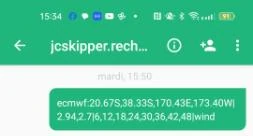
In reChain Grib, draw your area and tap “Copy request”. Each message will have to be copied over, so a small area, fewer forecast times or wind only will save you time. The app shows how many messages to expect before you send.
-
Send it from Earthmate
Paste the request into a new message to jcskipper.rechain@gmail.com and send it.
-
Wait for the messages
First you get an acknowledgement (“Received… Processing”), then the encoded messages
msg 1/10,msg 2/10… They can arrive well after the acknowledgement: keep the inReach on, with a clear view of the sky.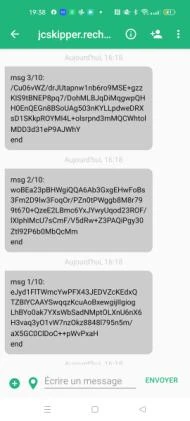
-
Open the first message
Tap the
msg 1/10message: its details page opens.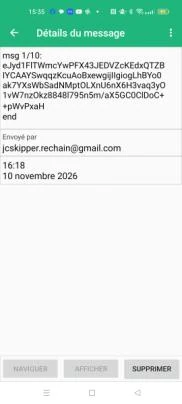
-
Forward it
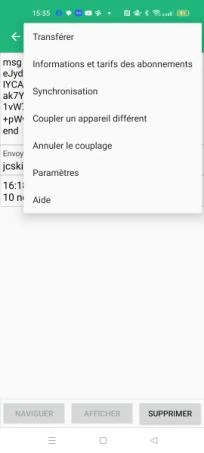
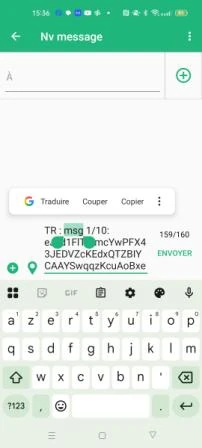
Tap the ⋮ menu at the top right, then “Forward”. A new message opens, with the text of the message after a short prefix (“TR :” in French).
-
Copy the text
Select the text, from “msg” to “end”, then tap “Copy”. No need to remove the prefix: reChain Grib ignores it. Don't send this message: it's only there so you can copy the text.
-
Paste it into reChain Grib
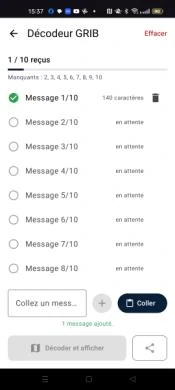
Open reChain Grib, then “Decode GRIB File”, and tap “Paste”. The message is added and the app shows which ones are missing.
-
Repeat for each message
Go back to Earthmate, leave the forwarded message without sending it, and repeat steps 4 to 7 with
msg 2/10, then the next ones. Tedious the first time, but you soon get the hang of it. -
Decode and view
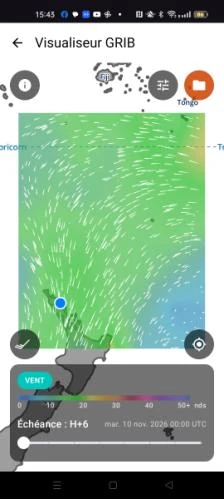
Once every message is in, tap “Decode & View”: the wind map opens, offline.
FAQ
Earthmate and reChain: your questions.
Does the forwarded message go out by satellite?
No, not unless you tap “Send”. Don't send it: it would count against your Garmin plan for nothing.
Do the messages arrive more slowly than with Garmin Messenger?
They can arrive well after the acknowledgement. reChain sends them all in under a minute; your inReach picks them up when it connects to the satellites. Keep it on, with a clear view of the sky.
What about Earthmate on iPhone?
This method was tested on Android. If you use Earthmate on an iPhone, write to us at jclevenne@jcskipper.com and tell us whether it works there too.
My inReach only works with Earthmate, not Garmin Messenger. Does reChain work?
Yes. First-generation inReach devices such as the original inReach Mini receive reChain's messages in the Earthmate app. Earthmate won't let you copy a received message, but its Forward option gives you the text. See the step-by-step guide.
Set sail with reChain.
Try it free with your Garmin inReach and an active subscription: 3 requests a month, weather and assistant combined.
Start with what you need:
GRIB weather
Install the reChain Grib app, draw your area, then send the request from your inReach.


Assistant
From your inReach, write your question like a text message, to this address:
Tracking
Create your page so family and friends can follow your route and write to you.
Already convinced? Go unlimited: ⭐ Go Premium · €9/month